
CHROME EXTENSION · WORKS OFFLINE · NO ACCOUNT
Turn any workflow into a step-by-step guide. Privately.
SnapSteps captures your clicks and screenshots inside your browser, then writes clear instructions for each step. Your guides and screenshots never touch our servers.
Free to start · No account needed · Upgrade only if you love it
Built for people who document other people's work
If you have ever screenshotted a process, pasted it into a doc, and then spent an hour writing what each image means, SnapSteps removes that hour.
Consultants hand off client workflows. Agencies onboard new staff. Support teams write repro steps. Course creators build lessons. SnapSteps turns the doing into the documentation, from SOPs to process documentation.
Consultants
"Client handoffs without the weekend."
Agencies
"Onboarding docs that write themselves."
Support teams
"Repro steps attached before the call ends."
Course creators
"Lessons drafted while you demo."
Record. Let AI write. Export.
Your step by step guide in three moves.
Record
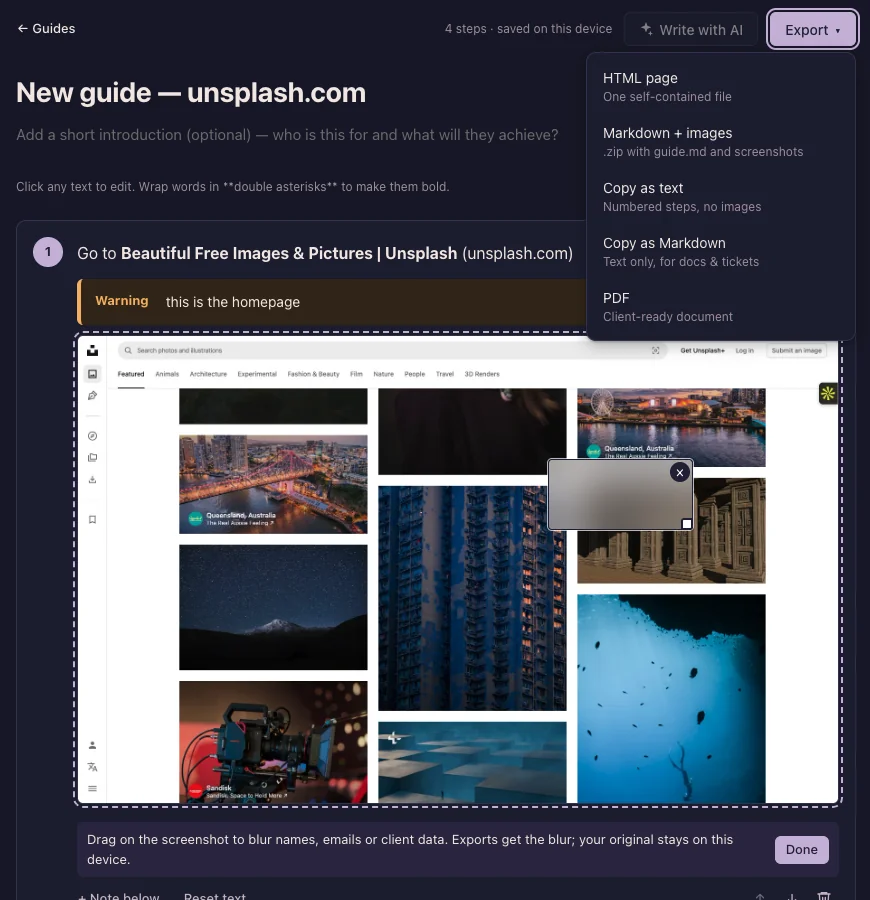
Click the SnapSteps icon, press Start recording, and do your work as usual. Every click becomes a numbered step with a screenshot. Pause anytime, add a tip or a warning, blur anything sensitive (Pro).
Let AI write
Press “Write with AI” and each step gets a clear, beginner friendly instruction. Free plan includes 50 AI written steps a day. Edited steps are never touched.
OFFLINE TEXT
Click Add payment method
WRITTEN WITH AI
Click Add payment method to start adding a new card to your billing settings.
Free plan: 13 of 50 AI-written steps used today.
Export
Markdown and HTML export are free forever. Pro adds polished PDF export ready to send to a client.
Everything happens on your device
Offline step text
Guides keep working with no internet. SnapSteps runs fully offline except AI writing and license checks.
Click highlight
A ring shows exactly which element each step refers to. Color configurable.
50 free AI steps daily
Enough for real guides every day, not a demo that expires.
Blur redaction
Drag a box over names, emails, or client data. Exports get the blur, your original stays untouched.
PDF export
Clean, client ready documents with no SnapSteps footer.
Passphrase encryption
Lock every guide with a passphrase only you know.
Free guide makers document your process on someone else's server. We don't.
Most guide tools are free for a reason. Your guides live on their platform, because the tool is the hook and the platform is the product.
SnapSteps has no platform. There is no account, no sync folder, no analytics. Screenshots are stored in your browser and never uploaded. AI writing receives only the page title, the page address with its query string removed, the label and type of the element you clicked, and the step number. Never the image and never what you typed. You can delete everything with one button, and the permissions we ask for are explained in plain words inside the extension.
Our server has no user database. Polar checks license keys, and the only thing we keep is a daily count of AI steps, filed under a one-way hash instead of your IP address and deleted after a day.
Permissions, and why
activeTab
Lets SnapSteps see the tab you are on only after you click its icon (or press the shortcut). This is how it takes screenshots without access to the rest of your browsing.
scripting
Adds the click listener to the page you are recording — only while recording, and removed when you stop.
storage + unlimitedStorage
Saves your guides and screenshots in this browser (IndexedDB). Screenshots add up, so the browser is told not to clear them to free space.
offscreen
A hidden page that reads the size of each screenshot while recording. It never leaves your device.
Same job. Different deal.
| Feature | Free hosted tools | Enterprise tools | SnapSteps |
|---|---|---|---|
| Price | Free | $35/mo | Free or $7/mo |
| Account required | Yes | Yes | No |
| Where guides live | Their servers | Their cloud | Your browser |
| Works offline | |||
| PDF export | Limited | Yes (Pro) | |
| Data redaction | Sometimes | Yes (Pro) | |
| Your data, your export | Lock in | Lock in |
Start free. Upgrade when it earns its keep.
Free
$0 forever
- Unlimited guides and steps
- Offline step text
- 50 AI written steps a day
- Markdown and HTML export
- Click highlight
Pro Monthly
$7 /mo
- Everything in Free
- Unlimited AI steps (fair use: 2,000 a day)
- PDF export
- Blur redaction
- Passphrase encryption
- Bring your own Anthropic key
- No SnapSteps footer
Pro Annual
$59 /yr
- Everything in Pro Monthly
- 30% off: $59 instead of $84 a year
- Under $5 a month, less than one coffee
- One payment, a whole year of easy guides
Cancel anytime. Your guides stay yours even after you cancel.